"New open standards created in the mobile era, such as HTML5, will win on mobile devices (and PCs too). Perhaps Adobe should focus more on creating great HTML5 tools for the future, and less on criticizing Apple for leaving the past behind."
Steve Jobs
April, 2010
Showing posts with label apple. Show all posts
Showing posts with label apple. Show all posts
Sunday, January 30, 2011
leadership
This is why I came to Apple.


Monday, April 12, 2010
Microsoft gets it - KIN equals win
KIN is Microsoft's second new phone system this year after Windows Phone 7.
Best described by this short quote:
As for KIN itself, you can watch the UI videos on Engadget explaining how it works. If you only watch one, watch the fourth one on photo sharing. All photos are automatically backed up to the cloud - so now you don't have to worry about losing the phone or how much memory is on the phone (well not as much anyway). A great concept - I love it.
I believe KIN, along with Microsoft's Windows Phone 7, will bring Microsoft's phone business back from the brink.
Best described by this short quote:
Windows Phone 7 is the "generic" smartphone platform to target a broad audience, Kin is for a specific subset of super-connected kids.I think Microsoft gets it. The Facebook, MySpace, Twitter generation. They may be coming in later than Apple and Google, but their new stuff is very compelling. And the target audience is going to eat this stuff up. I bet the data plans will be cheaper too, as in less than the current $30 a month. We'll see when Verizon makes an announcement.
As for KIN itself, you can watch the UI videos on Engadget explaining how it works. If you only watch one, watch the fourth one on photo sharing. All photos are automatically backed up to the cloud - so now you don't have to worry about losing the phone or how much memory is on the phone (well not as much anyway). A great concept - I love it.
I believe KIN, along with Microsoft's Windows Phone 7, will bring Microsoft's phone business back from the brink.
Friday, April 09, 2010
Kudos to Lee Brimelow - Adobe Evangelist
Apple's mobile products do not do flash. Apple's CEO has said that flash is a buggy CPU hog and a security risk.
Lee Brimelow works for Adobe - the company behind flash. In his latest blog post the comments are tuned off because "I’m not interested in hearing from the Cupertino Comment SPAM bots"
Nicely put, kudos to you Mr. Brimelow.
Lee Brimelow works for Adobe - the company behind flash. In his latest blog post the comments are tuned off because "I’m not interested in hearing from the Cupertino Comment SPAM bots"
Nicely put, kudos to you Mr. Brimelow.
Thursday, March 25, 2010
17.99 a month for the WSJ on the iPAD - really?
I don't know, 17.99 a month for Wall Street Journal on the iPAD seems like a lot to me. Of course, what do I know, I pay 12 for CABLE TV.
Wednesday, February 17, 2010
Snapdragon running Flash 10.1 on 3 devices with 3 different OS platforms
The Lenovo Skylight, the HTC HD2, and the Google Nexus One, each using a different OS (custom Linux, Winmobile 6.5, and Android respectively) all running Flash 10.1 on live websites. Very impressive.
Apple may not be in the Flash camp, but flash still runs many many web sites and video content. Flash will continue to do so for many years. I’m glad Snapdragon devices support it.
Bonus - the Skylight has a wireless USB mouse plugged into it. Looks great using standard equipment like that.
Friday, January 29, 2010
Can't wait for your own ipad, make a demo unit
Need to know if the iPad is right for you? Can't wait 60 days to find out? Make a 1:1 model. Don't forget to make it the correct weight. Like so:


Now carry it around everywhere you go and see how it fits in your life style. Here it is in the car:


Also, don't forget the apple logo on the back, orientation is important here:


My impression? It feels pretty heavy. Seems like for a book it is on the heavy side. For video and web surfing it is far less weighty than a laptop.
Screen size is huge. Likely just right. I'd really like to see it in person.
Thanks to Brandon for modeling.
Saturday, September 06, 2008
iPhoto Library Size #4 - Success
My iPhoto saga has ended happily with a working shared. I used an access control list method I found through Google.
I can use almost all the iPhoto features as either user. One strange thing is that I can't delete a photo as myself - but jen (whose account created the library) can. Whatever, I find it acceptable that I can read/write the files as myself. All this so that when I use the mac, once in a while, I can use iMovie and access the family's photos from there.
Next up - Quicken 2007 for mac.
Update 9/11/2008 - I can delete files. Hmmm, not sure why I could not before.
I can use almost all the iPhoto features as either user. One strange thing is that I can't delete a photo as myself - but jen (whose account created the library) can. Whatever, I find it acceptable that I can read/write the files as myself. All this so that when I use the mac, once in a while, I can use iMovie and access the family's photos from there.
Next up - Quicken 2007 for mac.
Update 9/11/2008 - I can delete files. Hmmm, not sure why I could not before.
Friday, September 05, 2008
shoe circus clown club
Not sure if the new Microsoft Ad campaign will sell anything. But its nice to see Seinfeld on TV again. Even if it is for just a minute 30 seconds. I thought the commercial was pretty funny. Here is a screen grab from Bill Gate's "platnum" membership card to the Shoe Circus Clown Club.

It might be funny, but its not as convincing as Apple's get a mac ads. Hopefully they won't have Bill adjust his shorts ever again.
What did you think of the ad?

It might be funny, but its not as convincing as Apple's get a mac ads. Hopefully they won't have Bill adjust his shorts ever again.
What did you think of the ad?
Wednesday, September 03, 2008
iPhoto Library Size #3
Try number 3... Maybe not mentioned before, but I also want to share the photo library with Jen. So I followed this KB article to create a mounted image.
The mounted image seemed to work. But I can only see photos that I imported, and Jen can only see photos that she imported.
There is this warning "Sharing iPhoto Library not recommended" in this KB. However a google search returns a lot of ways to share a library. Even this warning is unclear to me. I think it applies to pre iLife 08 versions (7.x) of iPhoto. Besides recommending not sharing contradicts the first KB.
In anycase, I'm going to have to check the groups, owners, and permissions of all the files. I'm guessing that since Jen and I are not in the same group we simply can't read the others photos.
Finally, since I've now created a shared image that needs to be mounted - I also followed this KB article which details how to make this mounting happen automatically at start up. But this didn't work for me when logging out and logging back in. Maybe on full boot it will - I haven't tried it yet.
Since this is so hard I'm guessing Apple doesn't think that a single laptop (iMac for that matter) would be used as a "family" computer. In my house, the family computer is used by at least Jen and I. We strictly use a single place on the computer to store ALL of our data. On our PC we had a folder at the root of C. We had links inside My Documents to that folder. This really helped backups and it was great when I wanted to get all our data to the mac - it was all in that one folder on the PC.
We are attempting to do the same thing with the Mac's users/Shared directory. On the pc we had a directory called photos under the top level folder. I wanted to point iPhoto at that same dir which now exists as users/Shared/photos - but that is not to be...
Ah, but this post is titled iPhoto Library Size - the size is way down. It is at 27 Gig. Which is a lot better than 104 gig. It is so different that I'm tempted to redo that first create to see if it is repeatable.... In any case, 27 Gig is "only" 3 Gig of overhead. I guess that the price one pays for quick thumbs.
I wonder if this would all be a lot different if I wasn't an engineer who uses Linux/Unix all day. I guess I'd likely show up back at the Mac store. Wonder if they'd make this work. Time for another experiment.
The mounted image seemed to work. But I can only see photos that I imported, and Jen can only see photos that she imported.
There is this warning "Sharing iPhoto Library not recommended" in this KB. However a google search returns a lot of ways to share a library. Even this warning is unclear to me. I think it applies to pre iLife 08 versions (7.x) of iPhoto. Besides recommending not sharing contradicts the first KB.
In anycase, I'm going to have to check the groups, owners, and permissions of all the files. I'm guessing that since Jen and I are not in the same group we simply can't read the others photos.
Finally, since I've now created a shared image that needs to be mounted - I also followed this KB article which details how to make this mounting happen automatically at start up. But this didn't work for me when logging out and logging back in. Maybe on full boot it will - I haven't tried it yet.
Since this is so hard I'm guessing Apple doesn't think that a single laptop (iMac for that matter) would be used as a "family" computer. In my house, the family computer is used by at least Jen and I. We strictly use a single place on the computer to store ALL of our data. On our PC we had a folder at the root of C. We had links inside My Documents to that folder. This really helped backups and it was great when I wanted to get all our data to the mac - it was all in that one folder on the PC.
We are attempting to do the same thing with the Mac's users/Shared directory. On the pc we had a directory called photos under the top level folder. I wanted to point iPhoto at that same dir which now exists as users/Shared/photos - but that is not to be...
Ah, but this post is titled iPhoto Library Size - the size is way down. It is at 27 Gig. Which is a lot better than 104 gig. It is so different that I'm tempted to redo that first create to see if it is repeatable.... In any case, 27 Gig is "only" 3 Gig of overhead. I guess that the price one pays for quick thumbs.
I wonder if this would all be a lot different if I wasn't an engineer who uses Linux/Unix all day. I guess I'd likely show up back at the Mac store. Wonder if they'd make this work. Time for another experiment.
Monday, September 01, 2008
iPhoto Library Size #2
UPDATE: This is by far the most read post on this blog. I did eventually get all the features I wanted from iPhoto. Here are my other iPhoto posts:
iPhoto Import Completed
iPhoto Library Size
iPhoto Library Size #3
iPhoto Library Size #4 - Success
Drop me a line in the comments, I'd like to know how you make out.
-mike
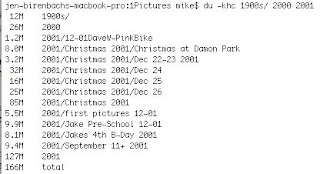
I deleted the 104 Gig gargantuan library. I imported just a few photos to see what happens. Here is the first set is 166 Megabits. Here is a unix disk usage for the files:
 I discovered in forums that iPhoto, when importing, can optionally keep its in own copy of the original, or use a link to the original. I decided to try the import both ways. First without the copy:
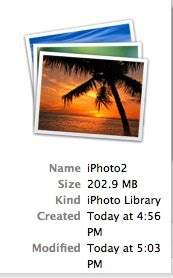
 I'm not impressed - 45 megabytes to describe 166 megabytes of data. Yikes. Here is the result when the photos are copied into the iPhoto library:
iPhoto Import Completed
iPhoto Library Size
iPhoto Library Size #3
iPhoto Library Size #4 - Success
Drop me a line in the comments, I'd like to know how you make out.
-mike
I deleted the 104 Gig gargantuan library. I imported just a few photos to see what happens. Here is the first set is 166 Megabits. Here is a unix disk usage for the files:
I discovered in forums that iPhoto, when importing, can optionally keep its in own copy of the original, or use a link to the original. I decided to try the import both ways. First without the copy:I'm not impressed - 45 megabytes to describe 166 megabytes of data. Yikes. Here is the result when the photos are copied into the iPhoto library:Doing a little math I can see that the overhead, the data needed to describe the iPhoto library, is larger when just a link is used than when the photos are copied in. 202 - 166 is 36. When the files are copied into the library, iPhoto needs 36 M for the database functions, but 45 M when they are left where they are.
Next I add a much larger directory of photos to see what would happen. This folder has 8.6 Gig of photos. The results (size includes earlier import of 166 M):
Size of original data: 8.8 Gig
size of linked library: 585 Meg
size of copied library: 9.4 Gig
This is much better than my first try. 9.4 Gig is only 6% larger than the original data set. This is acceptable. Interesting that with a small data set, 202/166, is 21% bigger. Looks like the overhead is large at first, but does not grow linearly with the photo data set size. This is good news.
What is the difference between my last post and now? For one, I have not imported all 17456 photos. The other difference is that before I was dragging the directories from the Finder into iPhoto. This time I'm using File->Import to library.
I'll be adding more photos later and will report how it goes.
So far my iPhoto experience has not lived up to my "mac just works" expectations. However the rest of the mac is great. I'll post on the good stuff when I get a chance.
So far my iPhoto experience has not lived up to my "mac just works" expectations. However the rest of the mac is great. I'll post on the good stuff when I get a chance.
iPhoto Library Size
My first disappointment. What is up with iPhoto 08's library size? I have 17456 photos which take up 24G of disk space. Three guesses how big my iPhoto library is.........
104 Gigabytes!!!!
Others have this same problem. It seems in iPhoto 08 it wasn't as bad. I'm going to have to delete this library and try again.
I do have version 7.1.2. I'm going to update to 7.1.4 before I do anything else.
Question: when the mac first booted it soon asked if I wanted to check for updates. I clicked yes - and it updated a bunch of stuff. Why wasn't iPhoto updated?!?
Saturday, August 30, 2008
iPhoto Import Completed
After two false starts, I'm happy to report that the photo import is complete. I failed twice to import all files at once with a single drag and drop. iPhoto crashed!

Oh well. I guess nothing is perfect.
I did get all 17476 photos to load by importing only one of my original directories at a time. Took 2.5 hours. Some of my directories (with subdirectories) had nearly 4000 photos in them.
iPhoto automatically created "events". It looks like it created an event per month plus more for large numbers of photos (grouped together) by date. It created a total of 275 events for our 8 years of photos. In any case our library looks like this:
Everything seems to be in there and working... I like the way it organizes things for you automatically by date. Things are very easy to find. The old system of having to look at file folders and really slow thumbs is much worse.
Couple things I really like about this computer. First, the automatic lighting adjustment feature is great. This machine has a very nice backlit keyboard. When the room gets darker, say because Jen turned of her nightstand light, the keyboard lit up. Conversely, and at the same time, the screen dimmed slightly. All this happened automatically. Moving the machine directly under my lamp reverses the situation.
Second, popup dialog boxes don't steal focus. Have you ever been working in windows and have a dialog box pop up and say something - but at that very moment you hit the return? Yikes what you might have needed to read is gone. Well it seems pop ups like this do not happen on a Mac. If you're working in another app and a background app brings up a dialog box - the doc icon for the background app bounces up to alert you. To see the dialog you switch to that app when you want to.
Well, having not slept last night I better go get some shut-eye!
Wednesday, July 23, 2008
Computers for the Kids
Getting a computer for your kids presents quite a few problems. Some of these are:
I just stumbled on a interesting $249 (minus keyboard, mouse, and monitor) solution: CherryPal.

It works like this: you buy the box, attach your keyboard, mouse and monitor to it and turn it on. It uses very little power itself and has almost no storage. How can it be any good? All the apps and your storage are kept on servers managed by CherryPal.
This means that your kids can only use what they provide which is currently: "OpenOffice.org office productivity suite, iTunes, a CherryPal-brand media player that supports all common files formats, and a CherryPal-branded instant messenger that supports all common IM programs." With more to come.
You can attach an external hard drive if you want to keep your files locally. They say they support printers, cameras etc. One thing they don't support is a monitor greater than 1024x768 - basically a deal breaker for anyone other than the kiddies. I could find some CRTs with this resolution, but no LCDs at NewEgg. 1024x768 is clearly old school.
This product is not available yet and I'd wait for professional reviews first. But looking at the web site CherryPal seems like an inexpensive way to get computing for your kids that is not maintained-by-dad.
Of course, if you have the cash, get a Mac.
- preventing unwanted programs
- preventing viruses and ad-ware
- keeping OS up to date
- keeping software running
I just stumbled on a interesting $249 (minus keyboard, mouse, and monitor) solution: CherryPal.
It works like this: you buy the box, attach your keyboard, mouse and monitor to it and turn it on. It uses very little power itself and has almost no storage. How can it be any good? All the apps and your storage are kept on servers managed by CherryPal.
This means that your kids can only use what they provide which is currently: "OpenOffice.org office productivity suite, iTunes, a CherryPal-brand media player that supports all common files formats, and a CherryPal-branded instant messenger that supports all common IM programs." With more to come.
You can attach an external hard drive if you want to keep your files locally. They say they support printers, cameras etc. One thing they don't support is a monitor greater than 1024x768 - basically a deal breaker for anyone other than the kiddies. I could find some CRTs with this resolution, but no LCDs at NewEgg. 1024x768 is clearly old school.
This product is not available yet and I'd wait for professional reviews first. But looking at the web site CherryPal seems like an inexpensive way to get computing for your kids that is not maintained-by-dad.
Of course, if you have the cash, get a Mac.
Subscribe to:
Posts (Atom)